NetCalculatorTM Help
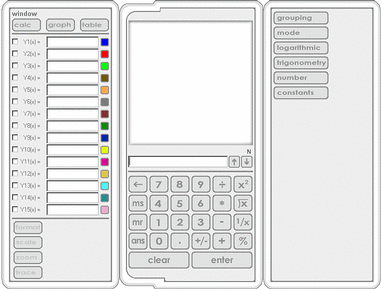
There are three modes available via the window select: Calculate, Graph, and Table.
Calculate Mode
- Access Calculate Mode by clicking on the Calculate tab of the window select.
- Enter an expression into the Command Line using Key Pad elements or computer keyboard. The expression
may contain any of the Key Pad elements available in Calculate Mode or may refer to one of Y1 - Y15 of
the Function Definitions. For example, the expressions "3 + 2" or
"Y2(3) - 4" may be entered into the Command Line and subsequently evaluated.
- Click Enter on the Key Pad or press the Enter key of computer keyboard to see the expression
displayed on the left side of the Calculate Display Area and evaluated on the right side of the Calculate
Display Area.
- Expressions that are not valid will not be evaluated.
Graph Mode
- Access Graph Mode by clicking on the Graph tab of the window select.
- Enter a well-defined function into one of Y1 - Y15 of the Function Definitions and
click Enter on the Key Pad or press the Enter key of computer keyboard. The function may
contain any of the Key Pad elements available in Graph Mode or may refer to one of the other Function
Definitions. For example, the functions "e^x" or "Y2(x) +
Y3(x)" may be defined.
- Once a function is well-defined in the Function Definitions, it can be displayed in the Graph Display
Area by checking the box to the left of its name.
- Functions that are not well-defined will not be displayed.
- Once a function is displayed in the Graph Display Area, clicking on the colored box next to
its definition will toggle the thickness of its line.
- The Graph Display Area can be manipulated via the Format, Scale, Zoom, and Trace Key Pad elements.
- To update the Graph Display Area once a function has been altered, click Enter on the Key Pad or
press the Enter key of computer keyboard.
Table Mode
- Access Table Mode by clicking on the Table tab of the window select.
- Enter a well-defined function into one of Y1 - Y15 of the Function Definitions and click Enter on the
Key Pad or press the Enter key of computer keyboard. The function may
contain any of the Key Pad elements available in Graph Mode or may refer to one of the other Function
Definitions. For example, the functions "e^x" or "Y2(x) +
Y3(x)" may be defined.
- Once a function is well-defined, its values can be displayed in the Table Display Area by checking
the box to the left of its definition.
- Functions that are not well-defined will not have their values displayed.